Showing posts with label Security. Show all posts
Showing posts with label Security. Show all posts
Sunday, September 20, 2015
How to Recover any Hacked Facebook Account?

Facebook is an addiction to many but is important for all, correct me if I am wrong but people have been so much obsessed with the social network, that many users (I personally know) have started using Facebook at work, family gatherings, at the airport, and where not? However, addiction like this can sometimes be harmful, not physically but mentally. It happens when an account of a person who is very much addicted to Facebook gets hacked.
Yesterday my good friend just call me. Her friend's Facebook Account was hacked. The guy who changed her password was changed her Email ID too. So, a girl or anybody who have no knowledge regarding this all, can recover her Account again?
Well, this is a good question. Here i mentioned some steps. Follow then but first read that how you can lose your account.
How you lose it?
An example could be: Since those regular users who always like to log in to their Facebook accounts to check their updates of ‘every second’ without caring if they are at some cafe, friend’s place or office etc. sometimes end up losing their Facebook profiles due to their utter fearlessness and carelessness. Some people share their passwords who closed to them, sometimes to their family members or some to their friends too. Looks Unbelievable but true. Many Softwares or apps also designed by hackers to steal passwords. So do not add unwanted Applications. Download applications from trusted and tested sites only.
How to recover my hacked account?
If you are one of those addicts whose Facebook account has been compromised due to the above mentioned carelessness or any other blunder, then you should follow the following steps to recover it:
Step 1: Go to www.Facebook.com/hacked/
Step 2: Click on My Account is Compromised

Step 3: Enter Email, Phone, Username or Your Fb Name.

Step 4: Enter your Old Password or Current Password.

Step 5: Maybe it will ask you to upload image of your Govt. approved ID Proof i.e. Passport, Adhaar Card, Driver License, Ration Card, etc. After uploading Proof it will reviewed by Facebook. If you upload correct proofs then sure it will send you a link in your Email. Click that link.
Step 6: Or, just click Continue on Secure Your Account.

Step 7: Set a new Password; Of course unique.

Step 8: Done.
Now you successfully recover your Facebook Account. But this time, don't share your password with anyone. LOL!! Hope this tutorial guide you. If you still have some problems then leave a comment below.

10 Steps to Secure Facebook Account

Facebook is become number one website on the Web. Even you are also log in to it every single day from many devices, like from your mobile phone, computer, laptop and your office workstation. There is a chance that you may leave your Facebook account without logging out. If your account gets accessed by any strangers then it’s going to open up a large can of worms. So you should seriously try to prevent unwanted access to your account.
One more Possibility for Account Hack is; if your smartphone or device gets stolen then. It’s a whole different matter. There are many ways to prevent access to your Facebook Account. In this article, we will go through some important options you can take to prevent others from accessing your personal Facebook account.
So, lets get Started...
1. Strong Password
You already have your password created for Facebook however it is advisable for you to make sure your Facebook password is one of a kind and different from your other online accounts e.g. email, blog, hosting etc.
To change your password, go to Account Settings > General > Password.
The best password is the combination of Small and Capital letters, Numbers and Symbols.
2. Add Phone Number
Confirming your mobile number is one of many ways to enhance your account security on Facebook. This way, even when you lose or forget your password, Facebook will be able to send you a new one via SMS.
To add your mobile number, go to Account Settings > Mobile and click on Add a Phone.
Select your country and set the mobile carrier before clicking Next.
Now you will be given an instruction to send an SMS to the given number. Follow the instructions to get a code via SMS, and then enter the code into the column. You also have the option to Share your number with friends on Facebook and Allow friends to text me from Facebook. Select your preferences and click Next.
Now your mobile phone is registered with Facebook, and when the need arises, this connection will be useful to reactivate your Facebook account.
3. Activate Trusted Contacts
Almost everyone have trusted friends and of course they are your friends on Facebook. Or, you must have family members added on your account. So, why should you don't add them as trusted contacts.
To add your trusted contact, go to Account Settings > Security and click on Trusted Contact.
Choose Trusted Contents
4. Activate Login Notification
When you or anyone login to new or untrusted browser then i will send Email or SMS.
To activate click Account Settings > Security and Login Notification

Click the check box of Email and Text Messages.
5. Activate Trusted Browser
Check once in a week your Trusted Browser.
To add your trusted browser, go to Account Settings > Security and click on Trusted Browsers.
6. Disconnect Previous Active Sessions
The good thing about Facebook is that it lets you know about your previous active sessions, where you log in from, and what devices you used to access your Facebook account. Now to make sure your account is safe, from the Account Settings > Security page, look for ‘Where You're Logged In‘ and click on Edit.

Now all previous sessions will be listed, together with the current active session at the top of the list. Click on the link ‘End Activity‘ to kill the activities from other devices.
7. Don’t ‘Keep Me Logged In’
The moment you want to login to your Facebook account, at the Log In page, there’s a small check box that says Keep me logged in. Make sure this box is unchecked. Then, log in as usual. With this on, you will be asked for your email and password every time you launch Facebook.

8. Avoid Spam Links
Facebook is serious about spam and is always enhancing its features to make sure you are safe from being a victim to scams. The types of attacks include money scams through direct or indirect requests via Facebook messages, chat etc, phishing links that will redirect you to fake websites, malicious links that could retrieve your personal information or even harm your computer. There are also chances you may receive emails from ‘Facebook’ but it is actually from a phishing website, this is part of a scam.
9. Sign Out After Use
Lastly which is the most important for all (and definitely worth repeating), never forget to log out from your Facebook account.
10. Don't Share your Password to Anyone
Never share your Password to anyone whether he/she is your Friend or any Family Member.
How to Lock Google Chrome with Password?

In present days everyone uses internet for different purposes and most of them uses Chrome browser to browse different websites, play games online and to do so many things. If you are the only user of your computer then there is no problem but if your PC is used by others then you must be worried about your settings, browsing history, saved passwords and everything what you did on internet. To prevent from this situation you can protect your browser with password, but no browser will provide an option to lock your browser with password.
Don’t worry we come up with one smart extension which protects your online session history, your web services passwords and so many other things.
LockPW is the ultimate extension for chrome users to protect their web browsers from others without accessing. It provides an incredible solution to lock down your browser with password. Actually all browsers have some security about storing passwords but no browser give full support to protect everything which is related to you on browser. This extension gives so many options which tighten your browser security. Here security means it doesn’t stop hacker attacks and malware attacks, it only protects your browser from other users who try to access physically.
How to?
#1: First of all you need to download LockPW extension.
#2: After installing it shows a message which means extension installed successfully, before using it you need to do some configurations. Click on Ok button to continue extension setup.
#3: Now you need to enable this chrome extension on “Incognito mode” also, because someone try to open it on private browsing mode. After enable it on Incognito mode click on next button.

#4: Now it shows another window with some FAQ (Frequently asked questions) and answers. It listed four questions about security of extension and provide some tips to harden your browser security. If you use non windows operating system then choose your operating system from drop down list. For future purpose print all question and answers
#5: After that click on Next button and you will see extension security settings. First type password which is not easy to guessed by others and again type the same password, type password hint which will be useful in case of forgetting password.
#6: Click on save button to turn on password protection, you can set automatic lock for your browser after certain time. Then it will automatically locks your browser with password protection.

#7: Restart the Browser. Done

Image Courtesy: Best Web Image - Web Blog
Thank you for patronizing Design Devta. I am sure your visit to us must be quite satisfying and in line with your expectations from us. Just in case, it's not as you expected from us or if you are facing any problem, kindly forward your feedback's directly to us by leave a Comment below or using our Contact form. And, get assured response from my side. Your feedback's and suggestions are extremely valuable to us. This Post is written by Harman Singh Hira. There is no any source so Copying or using this post for your own site is not allowed. If anyone do so get ready for facing DMCA. Please, if you like this post then share on your social networking sites. Assuring you of our best service always.
How to Track Facebook Logged in Locations?

Social networking sites vary in the levels of privacy offered. For some social networking sites like Facebook, providing real names and other personal information is encouraged by the site (onto a page known as a ‘Profile‘). These information usually consist of birth date, current address, and telephone number(s). Some sites also allow users to provide more information about themselves such as interests, hobbies, favorite books or films, and even relationship status. However, there are other social network sites, such as Match.com, where most people prefer to be anonymous. Thus, linking users to their real identity can sometimes be rather difficult. Nevertheless, individuals can sometimes be identified with face re-identification. Studies have been done on two major social networking sites, and it is found that by overlapping 15% of the similar photographs, profile pictures with similar pictures over multiple sites can be matched to identify the users.
On May 12, 2011, Facebook announced that it is launching several new security features designed to protect users from malware and from getting their accounts hijacked. Facebook will display warnings when users are about to be duped by clickjacking and cross-site scripting attacks in which they think they are following a link to an interesting news story or taking action to see a video and instead end up spamming their friends. Facebook also offers two-factor authentication called "login approvals", which, if turned on, will require users to enter a code whenever they log into the site from a new or unrecognized device. The code is sent via text message to the user's mobile phone. Facebook is partnering with the free Web of Trust safe surfing service to give Facebook users more information about the sites they are linking to from the social network. When a user clicks on a potentially malicious link, a warning box will appear that gives more information about why the site might be dangerous. The user can either ignore the warning or go back to the previous page.
How to Track Logging in Locations in Facebook?
#1: Log in to your Facebook Account.
#2: Click on Settings.
#3: Then click on Security from the right side menu.
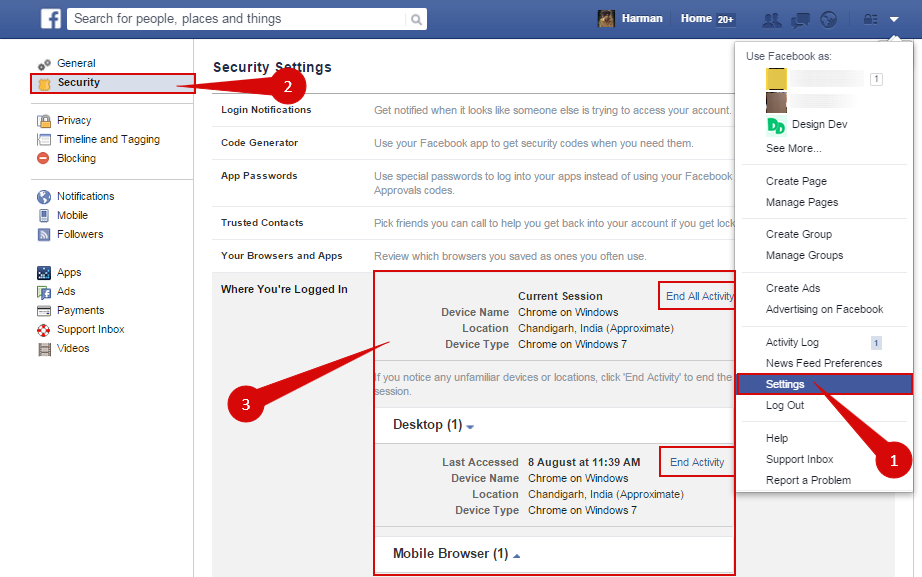
#4: Now, click on 'Where You're Logged In' option.
#5: The list will be appeared where your Facebook account currently opened.
#6: You can End activity by clicking on 'End All Activity'.
#7: Done.
Thank you for patronizing Design Devta. I am sure your visit to us must be quite satisfying and in line with your expectations from us. Just in case, it's not as you expected from us or if you are facing any problem, kindly forward your feedback's directly to us by leave a Comment below or using our Contact form. And, get assured response from my side. Your feedback's and suggestions are extremely valuable to us. This Post is written by Harman Singh Hira. There is no any source so Copying or using this post for your own site is not allowed. If anyone do so get ready for facing DMCA. Please, if you like this post then share on your social networking sites. Assuring you of our best service always.
List of 99 Sites to Unblock any Website Online

In computer networks, a proxy server is a server (a computer system or an application) that acts as an intermediary for requests from clients seeking resources from other servers. A client connects to the proxy server, requesting some service, such as a file, connection, web page, or other resource available from a different server and the proxy server evaluates the request as a way to simplify and control its complexity. Proxies were invented to add structure and encapsulation to distributed systems. Today, most proxies are web proxies, facilitating access to content on the World Wide Web and providing anonymity.
[adsense]
List of 99 Sites to Unblock any Website Online
- Proxy: www.proxy.org
- Unblocker: www.unblocker.us
- Fast USA Proxy: www.fastusaproxy.com
- New IP Now: www.newipnow.com
- Anonymouse: www.anonymouse.org
- K Proxy: www.kproxy.com
- h1de: www.h1de.net
- Zfreez: www.zendproxy.com
- Proxy Power: www.proxypower.co.uk
- Zalmos Web Proxy: www.zalmos.com
- Canada Proxy: www.canadaproxy.info
- King Surf Proxy: www.kingsurfproxy.com
- US Proxies: www.usproxies.info
- US Proxy: www.usproxy.nu
- Fast Time: www.fasttime.info
- Pun Proxy: www.funproxy.net
- Free Publick Proxy: www.freepublicproxy.net
- Proxyo: www.proxyo.info
- DeFilter: www.defilter.us
- Free Proxy Server: www.free-proxyserver.com
- Proxy Site: www.proxysite.com
- Hide My Ass: www.hidemyass.com
- Free YouTube Proxy: www.youtubeunblockproxy.com
- Don’t Filter: www.dontfilter.us
- Working Proxy: www.workingproxy.net
- Prox Me Call Me Names: www.proxmecallmenames.com
- Change IP & Country: www.anonymizer.nntime.com
- VTunnel: www.vtunnel.com
- Zacebook: www.zacebookpk.com
- Your Proxy: www.proxys.pw
- Just Unblock It: www.justunblockit.com
- Go Proxy: www.goproxy.asia
- Network Bypass: www.networkbypass.com
- Me Hide: www.mehide.asia
- Proxy This: www.proxythis.info
- PHP Proxy: www.phproxysite.com
- Xite Now: www.xitenow.com
- 4Ever Proxy: www.4everproxy.com
- KProxy Site: www.kproxysite.com
- Surf for Free: www.surf-for-free.com
- Intern Cloud: www.interncloud.info
- Pro Intern: www.prointern.info
- Singapore Proxy: www.singaporeproxy.nu
- Work Host: www.workhost.eu
- Travel VPN: www.travelvpn.info
- Fast Time: www.fasttime.info
- Rexoss: www.rexoss.com
- Hide IP Proxy: www.hideipproxy.com
- Host App: www.hostapp.eu
- Proxy Pirate: www.proxypirate.co.uk
- Fun Proxy: www.funproxy.net
- Hide N Seek: www.hidenseek.org
- Orange Proxy: www.orangeproxy.net
- Free Public Proxy: www.freepublicproxy.net
- Push Proxy: www.pushproxy.com
- Cool Proxy: www.coolproxy.biz
- Proxy Tube: www.proxytube.info
- Free Open Proxy: www.freeopenproxy.com
- BlewPass: www.blewpass.com
- SSL Proxy: www.sslproxy.org.uk
- Quick Proxy: www.quickproxy.co.uk
- Free Proxy Server: www.freeproxyserver.uk
- Free You Proxy Tube: www.freeyouproxytube.com/
- The Best Proxy: www.thebestproxy.info
- VPN Browse: www.vpnbrowse.com
- See Proxy: www.seeproxy.me
- FB Proxies: www.fbproxies.info
- PK Proxy: www.pkproxy.info
- America Proxy: www.americaproxy.info
- Suede Proxy: www.suedeproxy.info
- Korea Proxy: www.krproxy.info
- Surf Proxy: www.surfproxy.co
- Sporium: www.sporium.org
- Saoudi Proxy: www.saoudiproxy.info
- Proxy Browse: www.proxybrowse.info
- Proxy Internet: www.proxy-internet.info
- Ca Proxies: www.caproxies.info
- Proxy 2015: www.proxy-2015.info
- Proxy 2014: www.proxy-2014.com
- Just Proxy: www.justproxy.co.uk
- Extreme Proxy: www.extremeproxy.us
- Fast School Proxy: www.fastschoolproxy.com
- Remove Filters: www.removefilters.net
- Monster Proxy: www.monsterproxy.co.uk
- Hide Me Ass: www.hidemeass.co.uk
- UK – Proxy: www.uk-proxy.org.uk
- Proxy One: www.proxyone.net
- Hide The Internet: www.hidetheinternet.com
- Web Proxy Free: www.webproxyfree.net
- Mega Proxy: www.megaproxy.asia
- Crazy Proxy: www.crazyproxy.org
- IP Switcher: www.ipswitcher.us
- World Cup Proxy: www.worldcupproxy.com
- View Youtube: www.viewyoutube.net
- Proxay: www.proxay.co.uk
- Greatest Free Proxy: www.greatestfreeproxy.com
- Hide My Trax Proxy: www.hidemytraxproxy.ca
- Stardoll Proxy: www.stardollproxy.com
- Proxy 4 Freedom: www.proxy4freedom.com
- Fish Proxy: www.fishproxy.com
Thank you for patronizing Design Devta. I am sure your visit to us must be quite satisfying and in line with your expectations from us. Just in case, it's not as you expected from us or if you are facing any problem, kindly forward your feedback's directly to us by leave a Comment below or using our Contact form. And, get assured response from my side. Your feedback's and suggestions are extremely valuable to us. This Post is written by Harman Singh Hira. There is no any source so Copying or using this post for your own site is not allowed. If anyone do so get ready for facing DMCA. Please, if you like this post then share on your social networking sites. Assuring you of our best service always.
How to Report Suicidal Post to Facebook (2 ways)

Social media and suicide have an important relationship. In one widely known case, the death of Phoebe Prince, it is generally believed that her actions were motivated by cyberbullying. In 2008 police in the United Kingdom expressed concern that "Internet cults" and the desire for achieving prestige via online memorials may encourage suicides. Vincent Nichols, the Archbishop of Westminster, has warned that popular social networking sites lead young people to form "transient relationships" which put them at risk of suicide when they collapse. One of the rising research questions being asked by psychologists is where kids are getting the idea of suicidal tendencies. One of the explanations that have risen is the cause and effect relationship between social media advertised suicides and younger generations being influenced by them. One of the reasons behind kids being influenced by suicide tendencies via the internet is the psychological explanation behind "fifteen minutes of fame." Media tends to blow up videos and Facebook status' in order to inform the public of the rising trouble. However the media has yet to taken into consideration the band wagon appeal it brings to the young and immature minds of teenagers. Learning that an action like this can give a teenager, "fifteen minutes of fame" influences other teens who might feel under appreciated to do the same thing in order to gain attention. There was a research study conducted by the School of Public Health at the University of Sydney, Australia. This study was conducted in order to research whether there is a correlation between suicidal ideation and social media exposure to suicide stories among young adults (14-24). The study concluded that one of the most mentioned sources of suicide stories were social websites. This in mind, there was also a reported rise in feelings of hopelessness and suicidal tendencies among the participants surveyed. (Dunlop, More, and Romer 2009) [Wikipedia]
Recently Facebook started a tool to prevent Suicides if victim posted any suicidal status on Facebook. If your any friend or family member any such thing like this then you can save his/her life by taking a simple steps; just reporting his/her status to Facebook Team. You also check this page on Facebook about Suicide Prevention. There are two ways to report Facebook regarding this matter. First way is effective (according to me), recommend and easy also. But, i mention all two steps. Its up to you, which one you used (if in this situation)
#1 Facebook's Suicidal Content Report Page
- Click here
- Fill the form correctly
- Just click Send button
- Done
#2 Report on Post directly
Step 1: Click on the Down Arrow of the Post
Step 2: Click choose a option I don't like this post.

Step 3: Then a popup will appear. Select a option I think it shouldn't be on Facebook
Step 4: Click Continue

Step 5: Now choose an option It's threatening, violent or suicidal then of course Continue

Step 6: At last, select Suicidal Content or you can choose Self-harm option too.
Step 7: Click on Continue button.

Step 8: After this all, Facebook show you various option i.e. Offer help or support, Reach out to friend, Ask us to look at this post, Chat with the trained helper, Call lifeline, etc. It is depend on your country and region where you are living.
I hope this post will guide you well. God never made the situation like this but if you are in this situation, your stills can save someone's life.
Image Courtesy: United Academics
Thank you for patronizing Design Devta. I am sure your visit to us must be quite satisfying and in line with your expectations from us. Just in case, it's not as you expected from us or if you are facing any problem, kindly forward your feedback's directly to us by leave a Comment below or using our Contact form. And, get assured response from my side. Your feedback's and suggestions are extremely valuable to us. Please, if you like our this post then share on your social network. Assuring you of our best service always.
How to Browse Blocked Sites Faster on one touch?

Internet connects the world there is no restriction. However there are quite a few restricted websites too. These website services are blocked by geographical region of a country. It may be frustrating for some users because they cannot enjoy the website experience. Let's say an example , Spotify is an popular music streaming website which is available only for United States user's so you can't access the Spotify in your country. But there are so many options to access those restricted or blocked sites by changing your DNS server, VPN or using Proxy servers but these service don't come for free it filled with ads and most of them are dead slow. If you want a faster access to restricted sites continue reading this article.
Easy Access To County or Region Blocked Content
Hola is an free unblocker of censored websites in your country. Using Hola Unblocker you can access 10X faster internet. Hola is available for all platforms, it works on Windows software, Android App, Google Chrome extension, Firefox Plugin and also for Mac users. It unblock all the sites which are blocked in your country some of the major websites like Hulu, Netflix, Pandora, Fox and lot more. Hola Unblocker is free, with configurable VPN service. Hola is included with a few demo scripts for unblocking websites, so that you can test out. Developers can easily code new Hola scripts to unblock some additional sites .
Hola Unblocker Access To Country Restricted Websites
In this tutorial i am using Hola unblocker Chrome extension after installing the extension from their official website.You will be automatically redirected to a new page. You can see some major websites like Facebook, Gmail etc.. which will be represented in black and white which means that websites are not restricted by your region. You can also see sites like Pandora which are represented in Green which means that are restricted, by clicking the icon you are enabling the site, so it's no more country restricted. Now you can go to that website and check it out whether it's working or not.
Get Hola Extension for Your Browser.
Complaint to Google if Someone Copied your Content(s)

Copyright is a legal right created by the law of a country, that grants the creator of an original work exclusive rights to its use and distribution, usually for a limited time, with the intention of enabling the creator (e.g. the photographer of a photograph or the author of a book) to receive compensation for their intellectual effort. Copyright is a form of intellectual property, applicable to any expressed representation of a creative work. It is often shared among multiple authors, each of whom holds a set of rights to use or license the work, and who are commonly referred to as rightsholders. These rights frequently include reproduction, control over derivative works, distribution, public performance, and "moral rights" such as attribution.
Copyright Violation
One of the most important aspects of Wikipedia is that its text (not media; but that will be discussed shortly) may be freely redistributed, reused and built upon by anyone, under the terms of the Creative Commons Attribution-ShareAlike 3.0 Unported License (CC BY-SA) and, except where otherwise noted, the GNU Free Documentation License (GFDL) (unversioned, with no invariant sections, front-cover texts, or back-cover texts). Contributors agree to release their original content under both licenses when they submit it, and material from public domain sources or other compatibly licensed sources may also be used in accordance with the copyright policy, provided correct attribution is given.
However, copying material without the permission of the copyright holder from sources that are not public domain or compatibly licensed (unless it's a brief quotation used in accordance with Wikipedia's non-free content policy and guideline) is likely to be a copyright violation. Even inserting text copied with some changes can be a copyright violation if there is substantial linguistic similarity in creative language or sentence structure; this is known as close paraphrasing, which can also raise concerns about plagiarism. Such a situation should be treated seriously, as copyright violations not only harm Wikipedia's redistributability, but also create legal issues.
The situation for images and other media is slightly different, as a wider variety of licenses is accepted. But, in short, media which is not available under a suitable free license and which does not meet the non-free content criteria, should be assumed to be unacceptable.
Solution
Step 1: Click here or here
Step 2: Fill all Required Forms.
Step 3: At last, Click on Submit Button.
Step 4: Within a week, Google will send you an Email about your Complaint Status.
Step 5: Do according to that Email.
Thank you for patronizing Design Dev. I am sure your visit to us must be quite satisfying and in line with your expectations from us. Just in case, it's not as you expected from us or if you are facing any problem, kindly forward your feedbacks and comments directly to us by leave a Comment below or Contact us. And, get assured response from my side. Your feedbacks and suggestions are extremely valuable to us. Please, if you like this post then share on your social network. Assuring you of our best service always.
Top Best Browser Plugins for Site Unblocking

1. Hola! Better Internet (Tested by us)
Access websites blocked in your country, company or school with Hola! Hola is free and easy to use! Access websites blocked or censored in your country, company or school and stream media with the free Hola Unblocker VPN proxy service. Hola is a free and ad-free VPN proxy service that provides a faster and more open Internet.
2. ZenMate (Tested by us)
ZenMate is an easy to use Browser plugin that provides a VPN solution - encrypting all your browser traffic and routing it through ZenMate cloud to provide a secure and private browsing experience. Forget internet restrictions! They provide geo-switching options that will allow you to access blocked content wherever you are.
3 ProxMate
ProxMate is the swiss knife for accessing pages! A free application that boosts and proxies page content for you. Just like that! Ever wanted to use proxy benefits without loosing speed while regular surfing or using a VPN? Now you can!
4. ProxTube
The free Mozilla Firefox and Google Chrome extension. ProxTube helps you to view YouTube videos, which are restricted in your region and lets you enjoy the full variety of music.
5. Anonymox (Tested by us)
AnonymoX is an initiative for anonymization on the internet. The aim is to restore the user's right of anonymity in the web. Most websites monitor the behaviour of their users, giving the websites hosts the ability to analyze the general user behaviour and create detailed user profiles, which often times are sold to third parties.
6. Browsec (Tested by us)
Browsec encrypts your traffic and routes it through their secure cloud network. No one will be able to identify, track you or sniff your traffic.
7. Stealthy (Tested by us)
With stealthy you'll get access to the entire internet. No restrictions. No limitations. Get past all country or organizational limitations, restrictions, forbidden sites. Basically, you'll be like a spy, able to get through all areas, undetected. Stealthy does everything for you. You just turn it on and you are free to roam through all the internet. Stealthy is a simple, user-friendly add-on that lets you visit websites that are restricted based on geographical location, governmental or organizational regulations. Stealthy was originally developed to facilitate the dissemination of information during the Arab Spring. Even if your intents aren't quite as revolutionary, you'll still be able to visit sites that you normally can't because of your location, like YouTube videos from Germany, Pandora from outside the US or iPlayer from outside the UK.
8. friGate
Extention checks the availability of the site from their list, and if the website is not available then access to the site is through a proxy. Their proxy is not overloaded and created especially for them by their partners, so the speed of access through friGate proxy will not change. Therefore any site from their list is always available, even if the provider is accidentally blocked it.
Thank you for patronizing Design Dev. I am sure your visit to us must be quite satisfying and in line with your expectations from us. Just in case, it's not as you expected from us or if you are facing any problem, kindly forward your feedbacks and comments directly to us by leave a Comment below or Contact us. And, get assured response from my side. Your feedbacks and suggestions are extremely valuable to us. Please, if you like this post then share on your social network. Assuring you of our best service always.
How to Prevent Image Theft on Blogger?

Put plain and simple: the only way to protect your images from being downloaded or stolen off a web page is to not put them online in the first place. While I put this fact out there as blunt as possible, there are several techniques we can use to make website downloads and image theft much harder. Of course, image theft can be defined in a number of ways, and its definition - and hence measures (if any) taken to prevent it - will depend upon the individual.
There are many ways to protect images from being downloaded, ranging from modifying the image itself , to preventing webpages downloads, to being pro-active in finding unauthorized usage of images online. And while I discuss many common types of image protection, there are many others that I do not mention. A few of the techniques mentioned in this article are directed more towards web designers (these tips are marked with an *), but several can be used on photo sharing website's such as smugmug, flickr, pbase, and webshots.
What is image theft?
Image theft is the unauthorized use of an image, photograph, drawing, or illustration. Well duh. Is it really that simple? Of course not. The hard part is that many people differ in the definition of 'unauthorized use'. Where one person may not care whether their photograph is downloaded from a web page and placed on another website without their knowledge, there are some that find this to be blatant copyright infringement.
- Can I download an image? If you are interested in knowing whether unauthorized downloading and use is illegal: many websites will have an image use statement, and it is best and safest to ALWAYS ask the artist for permission. Ultimately, the default for image downloading and usage should ALWAYS be "All Rights Reserved" (eg don't use without permission).
- Can I protect an image? If you are an artist interested in protecting your images: it is best to first define for yourself what your policy on image theft is, then define the measures you need to protect your images (even if this means not putting your images online in the first place). It is important to publicly display your policy on image use in an image use statement on your website.
Image Protection with a Watermark
The most common, and possibly strongest, image protection technique is to place a visual copyright watermark on the image. Image watermarks come in a range of styles: from a full copyright symbol across the image to simply small text in the corner of an image containing the copyright symbol, date, and name of the copyright holder. There is a trade off with watermark size: the larger the watermark the less likely one is to download or steal the image, but the larger the watermark the more of a visual distraction it becomes.
How to do it in Photoshop: Image watermarks are easy to create in Photoshop: make a new layer with the desired text, adjusting its size and location to best suit your needs. To type the copyright symbol © in text, you can type option+g (mac) or Ctrl+Alt+C (PC). Changing the blending mode and opacity for this layer can create a more artistic and less obstructive watermark: for example 'soft light' layer blending can create a nice opaque blend. It is possible to further customize the watermark by using layer blending options such as a dropped shadow and/or beveling. Digimarc, a technology that can be integrated as a Photoshop plug-in, can also produce a digital watermark through the use of digital noise that is read by software. Despite the presence of a watermark however, its survival through image manipulations is not definite, and the lack of a visual symbol may not prevent image theft - only act as proof of copyright owner in case of theft.
Note: Of course an image watermark specifies a copyright directly in the image, but a copyright can also be clearly indicated in text near the image; including the date of copyright, the copyright holder's name, and your rights management (eg all rights reserved or a creative commons type license). For those that manage their own webpage, a copyright notice deserves special attention on its own webpage, indicating the copyright and your policy on image downloads, usage, and theft
Protect any Image with some simple Codes
If you search on Google about this then you will find many Articles regarding this all. For websites those are not hosted on Blogger has many ways to protect images but on Blogger, we have only less ways and techniques. One of the best technique i mentioned above but you can also do something more. I discover some codes to protect Images on Blogger. Just paste any Image link below then copy codes generated in Textarea.
I hope this trick work properly in your site. But make sure first check this trick in your site as test. Because if you are using customizing Blogger Template having Auto Read More Script, then maybe this is the possibility that Image should not index by Auto Read More. This is the Bug. We are working on it. If you face this issue then leave a comment below with your site link. We will trying to fix it. There are also many other several ways to protect images. Try them too.
Disable Right Click on Images only
This is also a another useful and working trick to protect images. You can easily safe your images by putting some simple Codes. This trick is also discover by me. This is easy to use. Just put some codes with your Image Codes. Like:
<a href="YOUR_IMAGE_LINK"><img oncontextmenu="return false" src="YOUR_IMAGE_LINK"/></a>
Add Green Codes in Image Codes and remove Red Codes from Image Codes. Now you or not anyone can right click on it.
Disable Right Click with JavaScript
Another measure to prevent right clicks on images is to use JavaScript. These short scripts over-ride browser right clicks. Rather than recreate a script that has been widely published in various forms over the internet, I will leave it to the reader to search Google for JavaScript Disable Right Click. I will however mention that JavaScript is client-side, and scripts such as these can not only effect the usability of a website, but can also readily be disabled by turning JavaScript off.
<script language=javascript>
<!--

//Disable right mouse click Script
//By Maximus (maximus@nsimail.com) w/ mods by DynamicDrive
//For full source code, visit http://www.dynamicdrive.com
//More at: www.DesignDev.co.vu

///////////////////////////////////
function clickIE4(){
if (event.button==2){
alert(message);
return false;
}
}

function clickNS4(e){
if (document.layers||document.getElementById&&!document.all){
if (e.which==2||e.which==3){
alert(message);
return false;
}
}
}

if (document.layers){
document.captureEvents(Event.MOUSEDOWN);
document.onmousedown=clickNS4;
}
else if (document.all&&!document.getElementById){
document.onmousedown=clickIE4;
}

// -->
</script>
Prevent Search Engine Indexing:
Protecting images from search engine indexing can be accomplished in two ways. First, a META tag can prevent images from getting indexed, but allow the rest of the page to be found in searches:
<meta name="robots" content="noimageindex"></meta>
This meta information prevents search engine spyders (eg. robots) from indexing images only: this is in contrast to using the "noindex" or "nofollow" contents tags which are general commands that effect the entire webpage. The second method is to use a robot.txt file. This file, which should be a plain text file created with a simple text editor and placed in the root directory of a website, is inspected by search engine spyders the moment they arrive and is a method to tell spyders which directories or files on a website to NOT visit and NOT index. If you have a directory that contains all images for a website, this can be added to the file:
User-Agent:*
Disallow:/images/
Disallow:/image.jpg
The above example tells spyders or 'bots', designated by the asterisk, to disregard the directory /images/ and disregard the file /image.jpg. It should be noted that not all search engines honor these methods, and while major search engines such as google, yahoo, and msn honor them there will be other search engines that will not. Note: In the case of online photo sharing websites, flickr allows you to remove images from public searches: this is done within the Privacy and Permissions section of your account.
Note: This will disable your Site Images to Indexing on Search Engines.
Hope my this article helps you. If you are facing any issue then just leave a comment below.
Thanks.
Saturday, September 19, 2015
Google Code Shutting Down Soon

Hello,
Earlier today, Google announced we will be turning down Google Code Project Hosting. The service started in 2006 with the goal of providing a scalable and reliable way of hosting open source projects. Since that time, millions of people have contributed to open source projects hosted on the site.
But a lot has changed since 2006. In the past nine years, many other options for hosting open source projects have popped up, along with vibrant communities of developers. It’s time to recognize that Google Code’s mission to provide open source projects a home has been accomplished by others, such as GitHub and Bitbucket.
We will be shutting down Google Code over the coming months. Starting today, the site will no longer accept new projects, but will remain functionally unchanged until August 2015. After that, project data will be read-only. Early next year, the site will shut down, but project data will be available for download in an archive format.
As the owner of the following projects, you have several options for migrating your data.The simplest option would be to use the Google Code Exporter, a new tool that will allow you to export your projects directly to GitHub. Alternatively, we have documentation on how to migrate to other services — GitHub, Bitbucket, and SourceForge — manually.
- Project 1
- Project 2
For more information, please see the Google Open Source blog or contact google-code-shutdown@google.com.
-The Google Code team
Thank you for patronizing Design Devta. I am sure your visit to us must be quite satisfying and in line with your expectations from us. Just in case, it's not as you expected from us or if you are facing any problem, kindly forward your feedback's directly to us by leave a Comment below or using our Contact form. And, get assured response from my side. Your feedback's and suggestions are extremely valuable to us. Please, if you like our this post then share on your social network. Assuring you of our best service always.
How to use Paypal Securely of iPhone?

PayPal is an American worldwide online payments system. Online money transfers serve as electronic alternatives to traditional paper methods like checks and money orders. PayPal is one of the world's largest internet payment companies. The company operates as an acquirer, performing payment processing for online vendors, auction sites and other commercial users, for which it charges a fee. Previously, you may use PayPal on your iPhone but Touch ID was not available in that time which was making it little insecure for the users. But, now iPhone has integrated Touch ID along with PayPal which will surely increase your PayPal’s security for sure.
Ones you have applied our steps then you’ll be using PayPal on your phone with complete security as Touch ID will be always there to ensure the security of your transactions as you’ll be the sole authority of all transactions.
How to Secure?
So, here are the steps which I have written for you guys. Now without taking your time more I would request you to get towards the below piece of writing to explore more about it.
#1: First of all, take your iPhone and Install PayPal app on your iPhone using this Link.
#2: Ones it is installed then it will automatically integrate the Touch ID support and will fix all the previous bug. If you are using the previous or old version of PayPal app then you are requested to update it, or reinstall the new version in order to enjoy the touch ID feature and other bug fixes.
#3: Now, whenever you’ll try to make purchases using your PayPal on your iPhone then it will ask for a Touch ID approval first which will be make your purchases more secure and will restrict them to yourself.
#4: This was it!
Original Source: All Tech Tricks
Thank you for patronizing Design Devta. I am sure your visit to us must be quite satisfying and in line with your expectations from us. Just in case, it's not as you expected from us or if you are facing any problem, kindly forward your feedback's directly to us by leave a Comment below or using our Contact form. And, get assured response from my side. Your feedback's and suggestions are extremely valuable to us. This Post is written by Harman Singh Hira. There is no any source so Copying or using this post for your own site is not allowed. If anyone do so get ready for facing DMCA. Please, if you like this post then share on your social networking sites. Assuring you of our best service always.
How to Root Android Device without PC in a Minute?

Rooting is the process of allowing users of smartphones, tablets and other devices running the Android mobile operating system to attain privileged control (known as root access) over various Android's subsystems. As Android uses the Linux kernel, rooting an Android device gives similar access to administrative permissions as on Linux or any other Unix-like operating system such as FreeBSD or OS X.
Rooting is often performed with the goal of overcoming limitations that carriers and hardware manufacturers put on some devices. Thus, rooting gives the ability (or permission) to alter or replace system applications and settings, run specialized apps that require administrator-level permissions, or perform other operations that are otherwise inaccessible to a normal Android user. On Android, rooting can also facilitate the complete removal and replacement of the device's operating system, usually with a more recent release of its current operating system.
Root access is sometimes compared to jailbreaking devices running the Apple iOS operating system. However, these are different concepts. Jailbreaking describes the bypass of several types of Apple prohibitions for the end user: modifying the operating system (enforced by a "locked bootloader"), installing non-officially approved apps via sideloading, and granting the user elevated administration-level privileges. Only a minority of Android devices lock their bootloaders—and many vendors such as HTC, Sony, Asus and Google explicitly provide the ability to unlock devices, and even replace the operating system entirely. Similarly, the ability to sideload apps is typically permissible on Android devices without root permissions. Thus, it is primarily the third aspect of iOS jailbreaking relating to giving users superuser administrative privileges that most directly correlates to Android rooting.
Caution: Rooting an Android device may Void your device warranty or if rooting process is not done properly, your device may also get bricked. We are not at all responsible any damages caused to your device while rooting.
How to Install?
#01: Go to your Phone Settings.
#02: Scroll down and click on Security

#03: Then Scroll down and Tick for unknown sources option.

#04: Maybe warning popup will be appear. Ignore it and Click Ok.

#05: First check supported devices for using this app
#06: If your Device supportable then download and Install the Framaroot App. [Direct Link v19.3]
#07: After installing, open the app.
#08: Now select what you want to install, Superuser or SuperSU.

#09: After selecting, click on Gandalf. If app crashed by clicking on Gandalf then don't worry. Relaunch the app and it will not crash second time.

#10: After sometimes, it will show you a message about success.

#11: Reboot your device.
#12: Done. Your device in rooted now.
Note: This tutorial was first publish on my previous Blog Ultimate Tech Blog but unfortunately that blog was hacked by someone so now i publish it again at here.
Thank you for patronizing Design Devta. I am sure your visit to us must be quite satisfying and in line with your expectations from us. Just in case, it's not as you expected from us or if you are facing any problem, kindly forward your feedback's directly to us by leave a Comment below or using our Contact form. And, get assured response from my side. Your feedback's and suggestions are extremely valuable to us. This Post is written by Harman Singh Hira. There is no any source so Copying or using this post for your own site is not allowed. If anyone do so get ready for facing DMCA. Please, if you like this post then share on your social networking sites. Assuring you of our best service always.
Subscribe to:
Posts (Atom)